Most meal planning advice is about the planned nights. Short Order is for the other ones: nothing on the plan, a fridge full of ingredients, and a household that can't agree. It turns what you can make into a menu, and turns "what do you want?" into an order.
It's free, it's on for every household, and here's the whole thing.
Write the menu in a minute
Open Short Order from the navigation and name your restaurant. Dad's Diner, Chez Garage, The Tuesday Grill, whatever makes you smile. Then type dishes one per line and press Enter:
- omelette
- pancakes
- quesadilla
- apple slices
- juice
- ice cream
The emoji and the course fill themselves in. Pancakes land under mains, apple slices under sides, juice under drinks, ice cream under desserts. Quick picks add the usual suspects with one tap. Anything you don't want to cook tonight gets switched off with a toggle. Nothing is deleted; it's just not on the menu right now.
Dishes can have options, the kind a real menu has: "Bread: white or wheat", "Toppings: cheese, bacon, tomato (pick any)". Add them under Edit. You can also link a recipe to a dish, which gives you a "Let's cook" shortcut from the ticket and the recipe's photo on the menu.
When the menu is ready, tap Set the menu. It's live. Close the kitchen takes it down again.
Everyone orders
On the Order tab, whoever is ordering picks their name. Household members with accounts and family members without them are all there, so it works for a partner as well as a six-year-old. Then they walk through the courses: pick a main, add a side, something to drink, dessert. Every course after the main has a "No thanks" button. Dishes with options open a little sheet of choices. There's a line for special requests. "No crust" is the all-time leader.
Place the order and the screen shows the ticket: Order #7 is in the kitchen, then cooking, then up. Kids can also order from the Kids screen when Little Chefs is on; it's the same flow with bigger buttons.
Cook from tickets
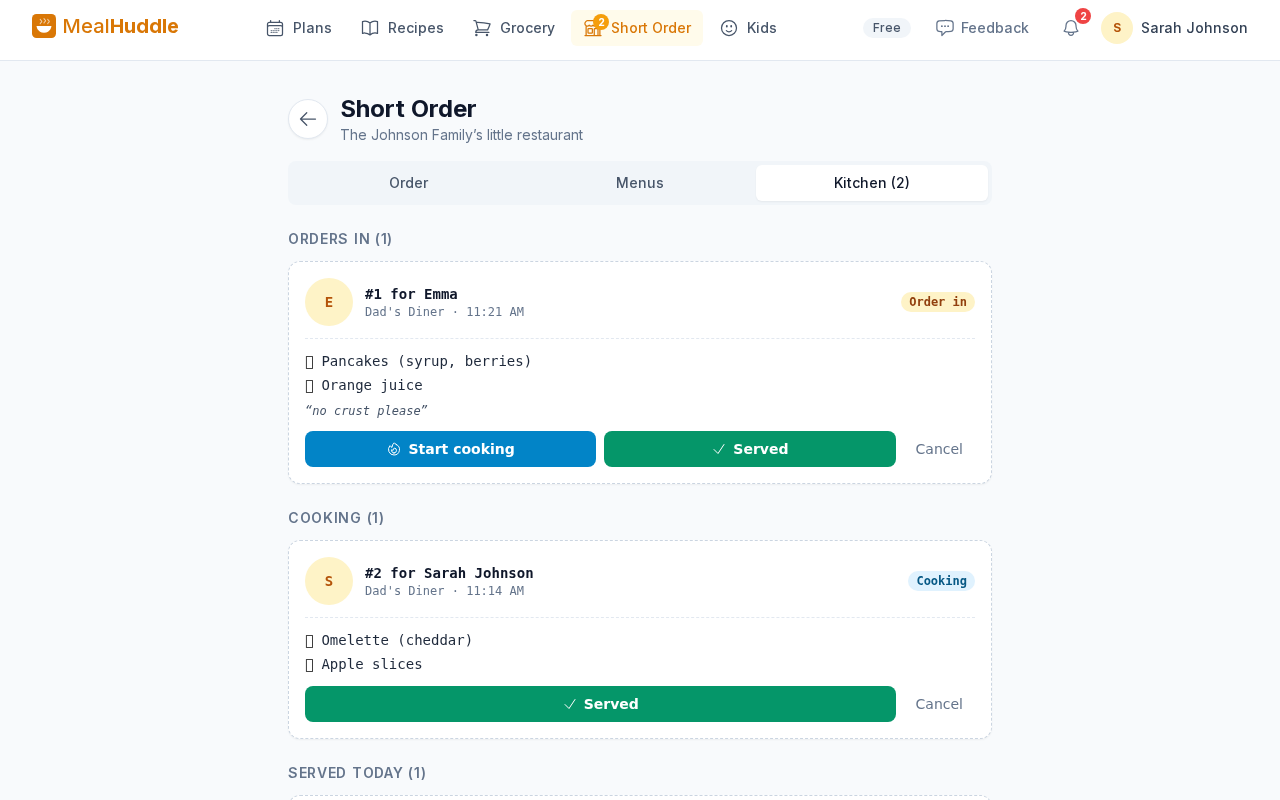
The Kitchen tab is your order board. Each ticket shows the number, who ordered, every dish with its options, and the note. Tap Start cooking and the person's screen updates. Tap Served when it's on the table. New orders ring the bell and show up in the navigation as a badge, so you don't have to keep the tab open.
Ratings and Regulars
Once a dish is served, whoever ordered it taps a face: meh, liked it, loved it. It takes a second, and over a few weeks the Regulars section on the Menus tab shows what each person orders most, how they rate it, and which dishes nobody has touched in a month. That's how you know when to change the menu.
The print kit
For the full restaurant feel, tap Print kit in the menu editor. Four pages, all built from your own menu:
- The menu, with a circle next to every dish for kids who like to order on paper.
- An activity placemat: tic-tac-toe, a word search made from your dishes, "unscramble tonight's menu", a pizza to top, a dot-to-dot, and a plate to draw dinner on.
- An order pad of guest checks for whoever is playing waiter.
- Chef badges with each person's name and a job title for the kitchen crew.
How to turn it on
Open Short Order from the dashboard card or from Settings, and tap Turn on Short Order. From then on it sits in the navigation next to Plans, Recipes and Grocery. The household owner can turn it off in Settings any time.
A few honest limits: there are no prices and no tipping (though a tip jar drawing on the placemat has been requested), nothing is added to your meal plan or grocery list, and it's not a delivery service. It's dinner at home with a menu.
Two stories from our house
If you want to see it in real life: restaurant night with the kids, where it started, and date night in, the version for two.