New in MealHuddle · Part of Pro
Meal Planning Assistant
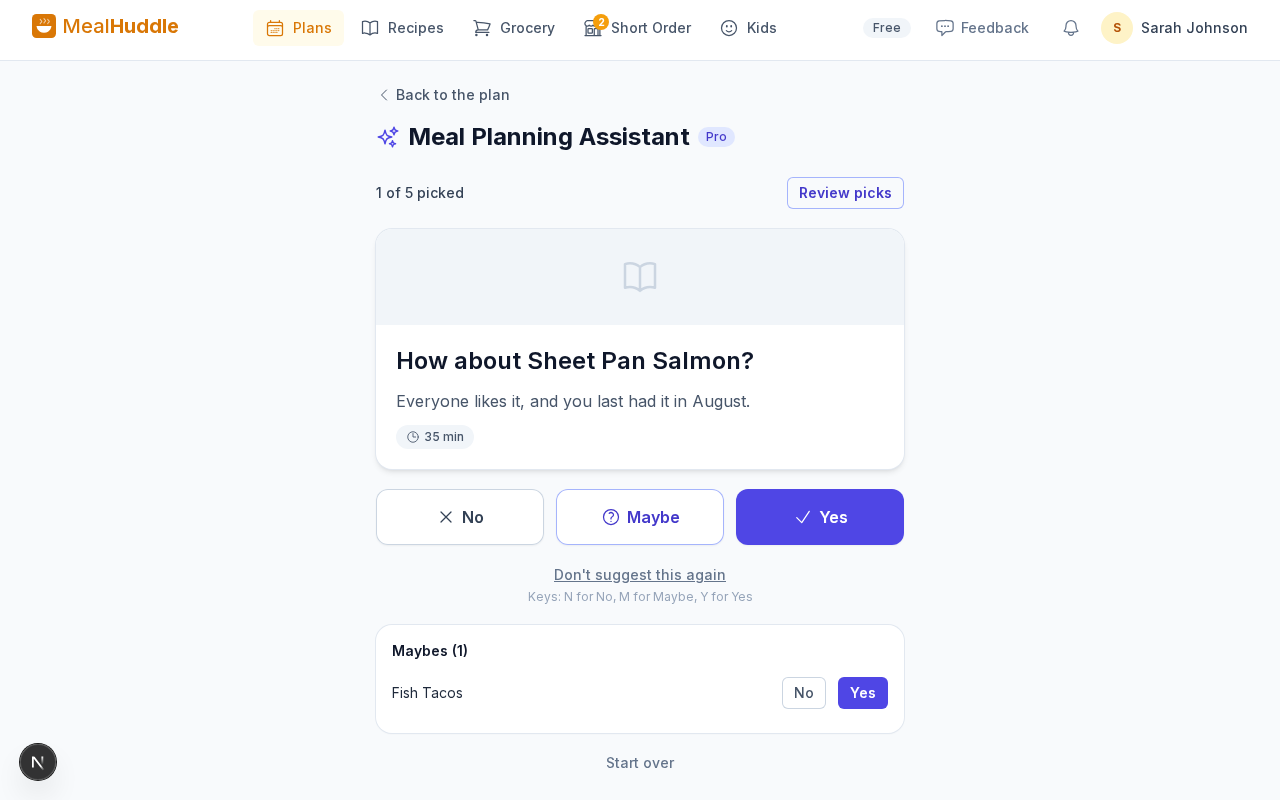
Say how many dinners you need. The assistant suggests ideas one at a time from your own recipes, led by the ones your household loves, each with the reason why. Yes, No or Maybe, and your picks go into the plan.
Where to find it
A plan with no meals → Plan with the assistant, in the List or Calendar view
How it works
- 1
Answer a few questions once
How many dinners you usually plan, how much time you have on a busy night, how adventurous to be, and any cuisines you want more or less of. Change them any time in Settings.
- 2
Say what you're in the mood for
With Pro, type a wish like "a fancy meal with fish and roasted vegetables" and the ideas lean toward it. Words like "no mushrooms" leave things out.
- 3
Yes, No or Maybe
Each idea comes with its reason: everyone likes it, you last had it in July, it fits your wish. Maybes wait below until you come back to them, and Undo takes back your last answer.
- 4
Add your picks
Review your picks and add them to the plan without days, so you can place them when you like. New recipes are saved to your recipes first.
Good to know
- Open it from a plan with no meals, in the List or Calendar view.
- With Pro, new recipes come from a recipe database and the web, like the ones you love or something different, and each links to the site it comes from.
- Don't suggest this again keeps a recipe out until you bring it back in Settings.
- Without Pro you get a preview of a few ideas from your recipes, with their reasons.
Questions
- Where do the ideas come from?
- From your own recipes, led by the ones your household rates highly, saves as favorites, asks for and makes often. With Pro, new recipes from a recipe database and the web join in.
- Does a No mean never?
- No. A No keeps one of your recipes out for about a month, and a new one for about two. To keep one out for good, tap Don't suggest this again; bring it back any time in Settings.
- Does everyone in the household see the same ideas?
- Yes. A plan has one list of ideas at a time, and anyone in the household can answer or add the picks.
- What about allergies?
- New recipes that could clash are left out. The recipe database filters for the allergies you set for family members, the web isn't searched, and for an allergy the database can't filter, no new recipes are suggested.
Your week, from the recipes you love.
Open a plan with no meals and tap Plan with the assistant.