New in MealHuddle
One photo, every recipe on it
A seasoning card with six things to make from it. A cookbook spread. A magazine page. One photo, and every recipe on it is yours to keep, checked first, saved together.
Where to find it
The camera button on Recipes, or Import → Photo on a new recipe
How it works
- 1
Snap it
Tap the camera button on Recipes, or open a new recipe and choose Import → Photo. The whole page in frame, straight on, in decent light.
- 2
Check the list
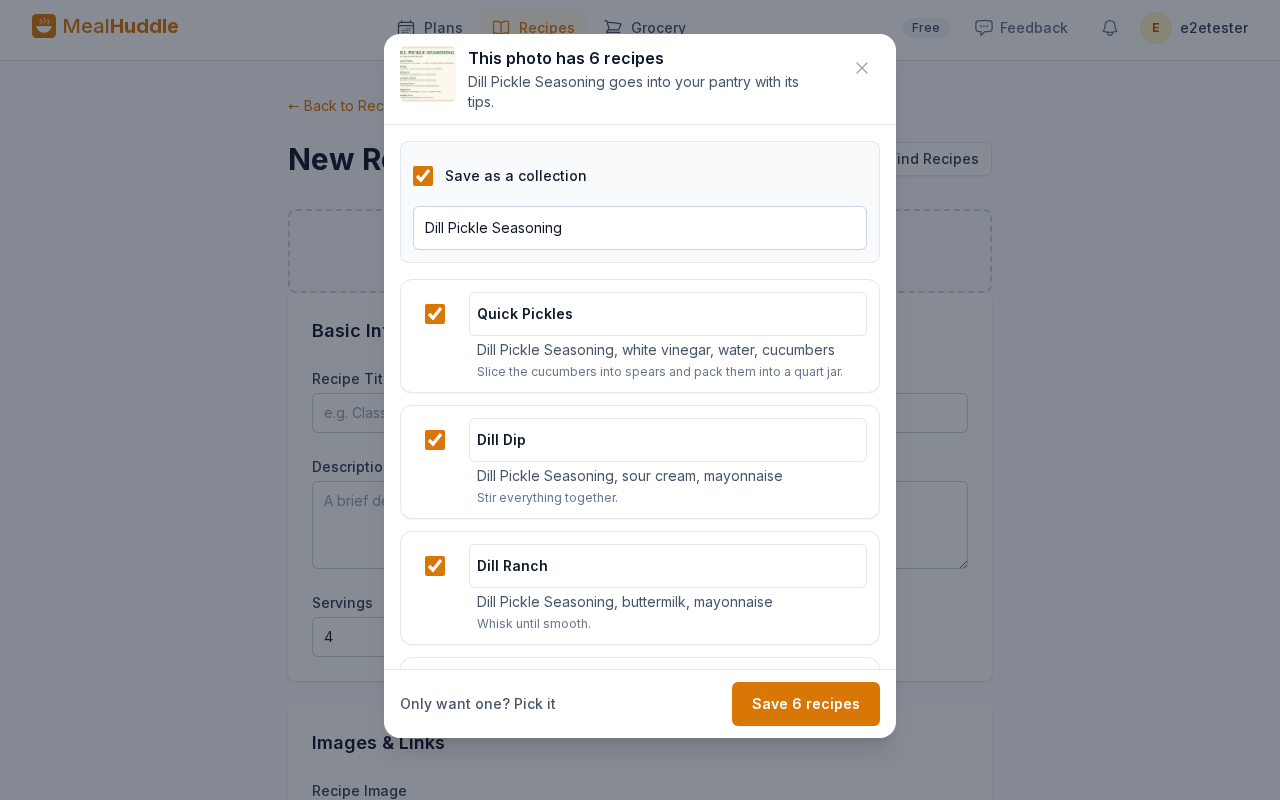
When a photo holds more than one recipe, a sheet lists each one with its ingredients and first step. Uncheck anything you do not want, rename what it misread, or pick just one to finish in the form.
- 3
Saved as a set
The recipes land as separate recipes in a collection named after the product, or whatever you call the page. When the photo is a product card, the product goes into your pantry with the card's tips, and every recipe lists it, so searching its name finds them all.
Good to know
- The photo you snapped is kept in each recipe's gallery and never shown anywhere else: not as the cover, not on the recipe grid, not on a shared link. Add a photo of the dish for the cover, or delete the snapped photo from the gallery any time.
- A page with one recipe still fills the form the way it always has.
- A recipe whose title you already have is skipped, so snapping the same card twice adds nothing twice.
- Up to twelve recipes from one photo. For a dense page, a closer photo of part of it reads better.
- Photo import is free for everyone.
Questions
- What counts as a recipe on the page?
- Anything with its own title, ingredients and steps. A serving idea with no amounts, like "sprinkle it on popcorn", becomes a tip on the product in your pantry instead of a recipe of its own.
- Where does the product go?
- Into your pantry library, with the card's own line and tips as its description. Every recipe from the card lists it as an ingredient, so the pantry entry shows them all under Used in recipes.
- Where does the photo I snapped show up?
- Only in that recipe's gallery, when you open the recipe. It is never used as the cover, so it does not appear on the recipe grid, in a collection or on a shared link, and you can delete it from the gallery any time.
Six recipes on the card, six in your library.
Snap it from the camera button on Recipes. Free for every household.