New in MealHuddle
Save recipes from TikTok links
You saved the video, and now it's somewhere under all the others you saved. Paste its link into MealHuddle instead and it becomes a recipe in your library: named, credited to its creator, and one tap from the video when it's time to cook.
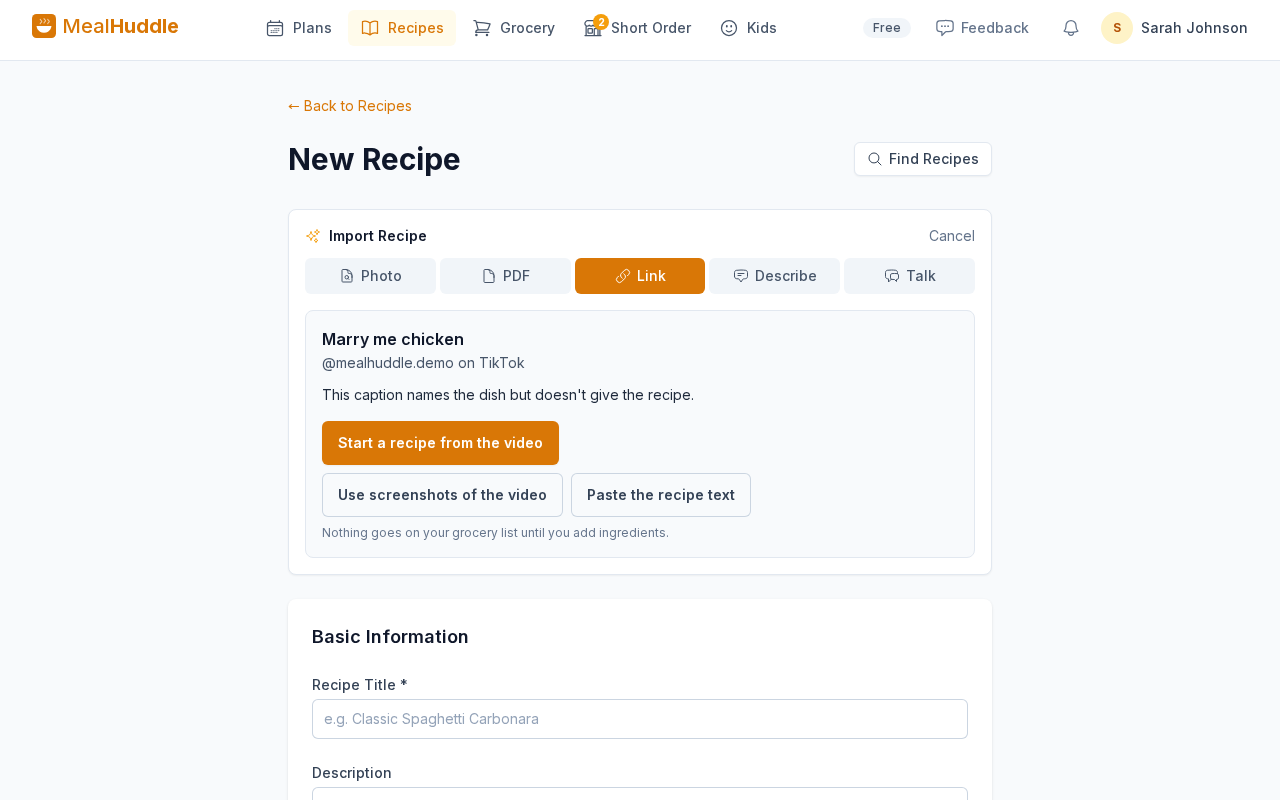
Where to find it
Import → Link on a new recipe. On a phone, the + button on Recipes has Paste a Link
How it works
- 1
Paste the link
In TikTok, tap Share, then Copy link. In MealHuddle, open a new recipe, choose Import, then Link, and paste. On a phone, the + button on Recipes has Paste a Link.
- 2
See what was written
MealHuddle reads the caption posted with the video. When the recipe is written there, the ingredients and steps fill in the form for you to check. It doesn't watch the video.
- 3
Keep it either way
When the recipe is only in the video, start a recipe from it. The link and the creator's name go into the recipe, and you add the ingredients as you watch. Or use screenshots of the video, or paste the recipe text if you have it.
Good to know
- A recipe saved from a TikTok or Reddit post keeps its creator's name in its notes and a button back to the post under its title, so the video is always one tap away. Search a creator's name to find everything you saved from them.
- A recipe with no ingredients yet puts nothing on your grocery list. Add them the first time you cook it and it works like any other recipe.
- Reddit posts work too: the post itself and what its author wrote underneath.
- MealHuddle can't read Instagram or Facebook posts from a link. Paste one anyway and you can name the dish and keep the link, or use screenshots. For a Pinterest pin, open the pin and paste the link of the recipe page it leads to.
- Saving from a link is free for everyone.
Questions
- Does MealHuddle watch the video?
- No. It reads the caption posted with the video. If the recipe is only spoken or shown on screen, MealHuddle saves the link and the creator's name, and you add the rest.
- What if the caption only names the dish?
- Plenty of videos do that. You'll see the dish and who posted it, with three ways to go on: start a recipe from the video, use screenshots of it, or paste the recipe text. Whichever you pick, the recipe keeps the video's link and its creator's name.
- Is the creator credited?
- Yes, wherever MealHuddle can read the post. On TikTok and Reddit their name is saved with the recipe along with the link, and the recipe page has a button back to the post. The recipe stays their work, so please keep that credit if you share it. For a link MealHuddle can't read, the link is kept and you can add their name to the notes yourself.
- Which links work?
- TikTok videos and Reddit posts are read. Links to recipe websites work as they always have. YouTube, Instagram, Facebook, Threads and X links aren't read, but you can still name the dish and keep the link. For a Pinterest pin, paste the link of the recipe page it leads to.
- What does MealHuddle send to TikTok?
- Only the link you pasted. MealHuddle asks TikTok for the post's public caption and its creator's name, which anyone can see. Nothing from your MealHuddle account or your household goes with it.
The video you saved, where you'll find it again.
Paste a link from Import on any new recipe. Free for every household.
TikTok, YouTube, Reddit, Instagram, Facebook, Threads, X and Pinterest are trademarks of their owners. MealHuddle is not affiliated with or endorsed by any of them.