Let AI handle the meal planning
MealHuddle uses AI to suggest meals, generate recipes, guide you through cooking, and learn what your household loves.
Sound familiar?
“I spend more time deciding what to cook than actually cooking it.”
Tap "Surprise Me" and get a personalized meal suggestion based on what your family has enjoyed, what you haven’t cooked recently, and what’s already on the plan.
“AI meal apps keep suggesting random recipes I’d never make. They don’t know my family.”
MealHuddle suggests from YOUR recipe library — meals your household already knows and loves. The more you cook and rate, the smarter the suggestions get.
“I have an idea for a dish but no recipe. I end up Googling for 20 minutes.”
Describe what you want — "a creamy chicken pasta with sun-dried tomatoes" — and get a complete recipe with ingredients, steps, and timing in seconds.
“I found a great oven recipe but I want to make it in the air fryer. Now what?”
Convert any recipe between cooking methods — oven to air fryer, stovetop to slow cooker, grill to bake — with adjusted times and temperatures.
Here's how MealHuddle helps
Personalized meal suggestions
Surprise Me picks from your own recipe library based on household ratings, cooking history, and what’s already on the plan. No random internet recipes — just meals your family will actually eat.
Generate recipes from a description
Describe a dish in your own words and get a complete recipe with ingredients, steps, prep time, and servings. Describe a full meal and get it split into individual recipes with a shopping list.
Step-by-step Chef Mode
Chef Mode breaks any recipe into a clear prep checklist and numbered cooking steps. Check off items as you go, track progress, see who’s cooking, and ask questions by voice while your hands are busy.
Convert between cooking methods
Found a recipe you love but want to use a different appliance? Convert between oven, air fryer, slow cooker, grill, stovetop, and Instant Pot with adjusted times and temperatures.
See it in action
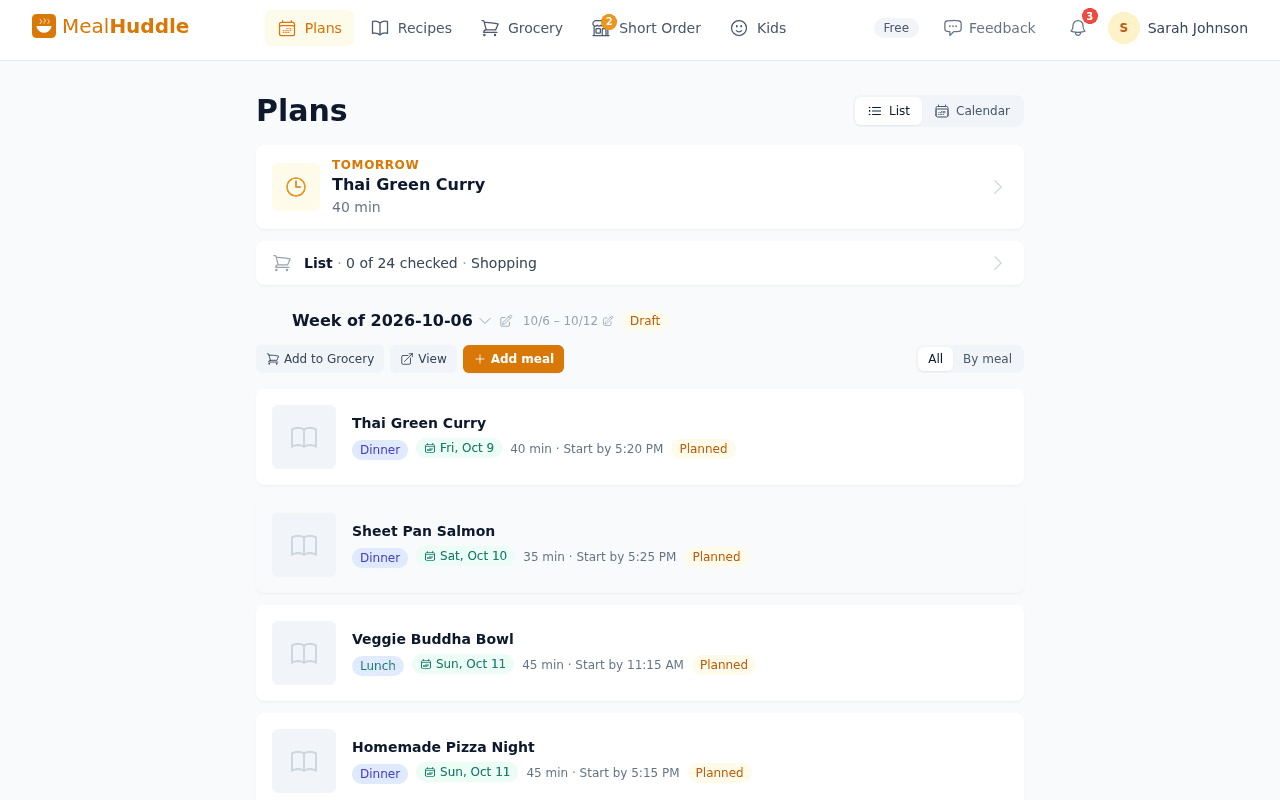
A real look at what meal planning looks like with MealHuddle.
Frequently asked questions
- What AI features does MealHuddle have?
- MealHuddle uses AI for meal suggestions (Surprise Me), recipe generation from descriptions, step-by-step Chef Mode with voice Q&A, cook method conversion, recipe import from photos and PDFs, receipt scanning, and auto-detection of difficulty, cuisine, and cook times.
- Does the AI learn what my family likes?
- Yes. Surprise Me uses your household’s ratings, cooking frequency, and current plan to suggest meals your family will actually enjoy. The more you cook and rate, the better it gets.
- Are AI features free?
- Recipe import (photos, URLs, PDFs) is free. AI features like Chef Mode, Surprise Me, recipe generation, and cook method conversion are included with Pro. You can try Pro free for 14 days.
- Can I generate a full meal plan with AI?
- You can describe a full meal and get it split into individual recipes with a shopping list. For weekly planning, Surprise Me suggests one meal at a time based on your household’s preferences, so every addition feels intentional.
Ready to try it?
MealHuddle is free for your whole household. Set up in under a minute and start planning meals together.
More solutions
Meal planning that actually works for families
Most meal planning apps were built for one person. MealHuddle was built for your whole household.
A grocery list that doesn’t lose your items
Auto-generated from your meal plan, organized by department, and synced in real time while you shop.
Import recipes from anywhere — photos, PDFs, URLs
Stop retyping recipes from cookbooks and screenshots. Snap a photo, paste a link, upload a PDF, or save with one click from the Chrome extension.
Free meal planning without the paywall tricks
A generous free tier that covers everything a household needs to plan meals, share recipes, and generate grocery lists.
Plan meals together, in real time
When someone adds a recipe, edits a meal, or checks off a grocery item, everyone in the household sees it instantly.
Generate recipes from a description
Describe what you want to cook and get a complete recipe with ingredients, steps, and timing — in seconds.
A grocery list that thinks ahead
Auto-generated from your meal plan, organized by department, and smart enough to scan your receipts when you’re done.
Cook together, from anywhere in the kitchen
Start a live cooking session, check off steps as you go, and see who’s cooking and where they are in the recipe.
Turn any recipe into yours — instantly
Snap a photo of a cookbook, paste a URL, or upload a PDF. Smart import extracts the recipe and adds it to your library.