Plan meals together, in real time
When someone adds a recipe, edits a meal, or checks off a grocery item, everyone in the household sees it instantly.
Sound familiar?
“My partner and I share one login. When we’re both on the app it overwrites each other’s changes.”
Everyone gets their own account. Changes merge in real time — no conflicts, no overwriting.
“I added meals to the plan at work but my husband couldn’t see them until I got home and showed him.”
Every change syncs instantly. Add a meal on your phone and your partner sees it on their screen within seconds.
“We both bought chicken because neither of us could see the other checked it off the list.”
Grocery list check-offs sync in real time. Shop from different aisles and see each other’s progress live.
“I wish my roommates could add their own meals without me having to do it for them.”
Every household member can add, edit, and rearrange meals. No single gatekeeper — everyone contributes.
Here's how MealHuddle helps
Separate accounts, shared everything
No shared logins, no password sharing. Everyone gets their own account with full access to the household’s recipes, meal plans, and grocery lists.
Instant sync across all devices
Add a recipe on your laptop, see it on your partner’s phone. Check off a grocery item in the store, see it update on the kitchen tablet. No refresh required.
Shop together from anywhere
Split the grocery list between family members and shop from different stores or aisles. Every check-off and price update syncs in real time.
See who added what
Notifications keep you in the loop. Know when someone adds new recipes, when the meal plan changes, or when your grocery list is running low.
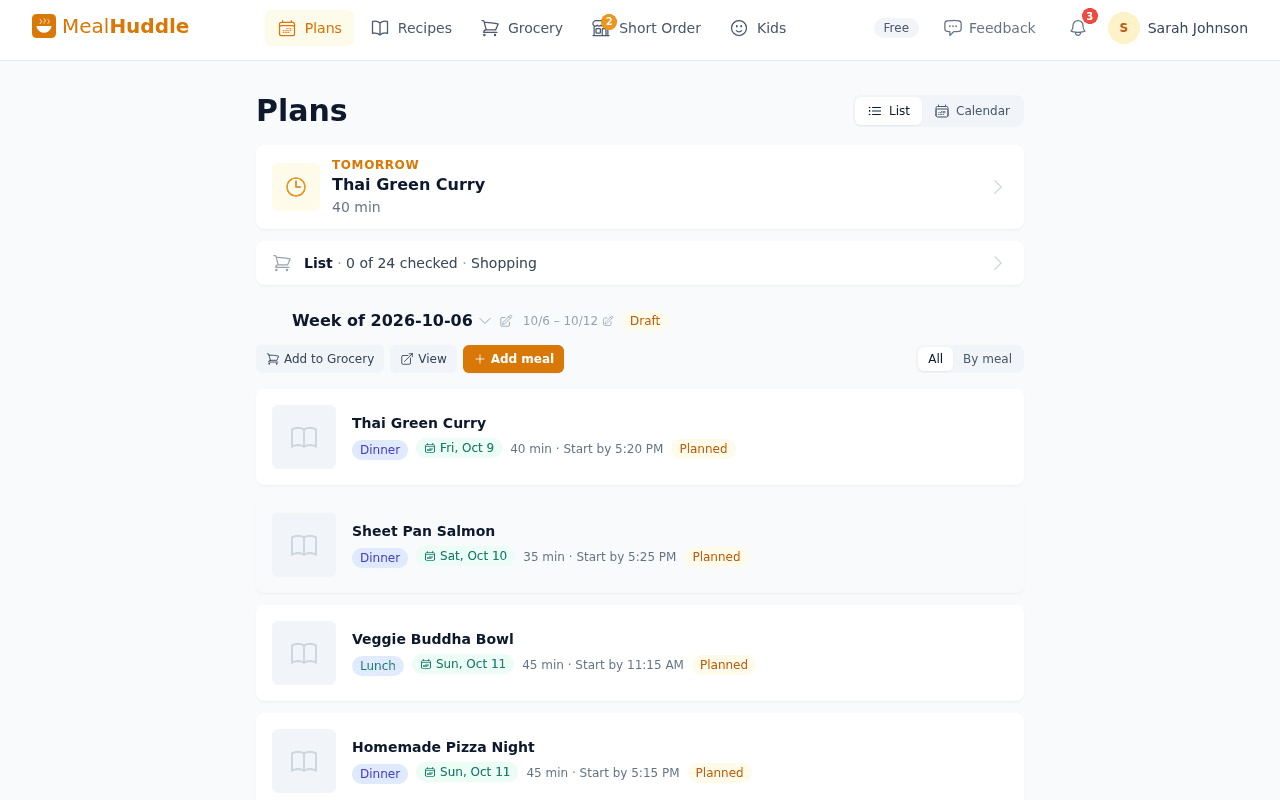
See it in action
A real look at what meal planning looks like with MealHuddle.
Frequently asked questions
- How does real-time sync work?
- Every change — adding a meal, editing a recipe, checking off a grocery item — syncs instantly to all household members. No refresh button, no delay.
- Do we need separate accounts?
- Yes, and that’s the point. Everyone gets their own login so there are no conflicts, no overwriting, and no shared passwords. Invite members with a link or QR code.
- Can we use different devices?
- Absolutely. MealHuddle works in any browser — phones, tablets, laptops. Changes sync across all of them in real time.
- Is real-time sync a paid feature?
- No. Real-time sync and household sharing are included in the free plan. Unlimited members, unlimited devices, no extra cost.
Ready to try it?
MealHuddle is free for your whole household. Set up in under a minute and start planning meals together.
More solutions
Meal planning that actually works for families
Most meal planning apps were built for one person. MealHuddle was built for your whole household.
A grocery list that doesn’t lose your items
Auto-generated from your meal plan, organized by department, and synced in real time while you shop.
Import recipes from anywhere — photos, PDFs, URLs
Stop retyping recipes from cookbooks and screenshots. Snap a photo, paste a link, upload a PDF, or save with one click from the Chrome extension.
Free meal planning without the paywall tricks
A generous free tier that covers everything a household needs to plan meals, share recipes, and generate grocery lists.
Let AI handle the meal planning
MealHuddle uses AI to suggest meals, generate recipes, guide you through cooking, and learn what your household loves.
Generate recipes from a description
Describe what you want to cook and get a complete recipe with ingredients, steps, and timing — in seconds.
A grocery list that thinks ahead
Auto-generated from your meal plan, organized by department, and smart enough to scan your receipts when you’re done.
Cook together, from anywhere in the kitchen
Start a live cooking session, check off steps as you go, and see who’s cooking and where they are in the recipe.
Turn any recipe into yours — instantly
Snap a photo of a cookbook, paste a URL, or upload a PDF. Smart import extracts the recipe and adds it to your library.